
Caido v0.58.0
Replay Pipeline, HTTP/2 beta, HTTPQL header and body filters, a rebuilt Plugins page, and a customizable sidebar

Ian Bouchard
•
August 24, 2026
5 min read
Race condition testing depends on timing. Several requests need to reach the same server-side state within a narrow window. Until now, reproducing that timing in Caido meant leaving Replay or coordinating the requests yourself.
Caido v0.58.0 adds Pipeline sessions to Replay for that workflow. It also ships HTTP/2 in beta, expands HTTPQL with precise header and body filters, rebuilds the Plugins page, and lets you customize the sidebar.
Test race conditions with Replay Pipeline
Replay now has a third session type alongside HTTP Request and WebSocket: Pipeline.
A Pipeline session groups several requests into one run. Select New Session and choose Pipeline. Add requests under Requests, select a Pipeline strategy, then press Run.
v0.58.0 · Replay Pipeline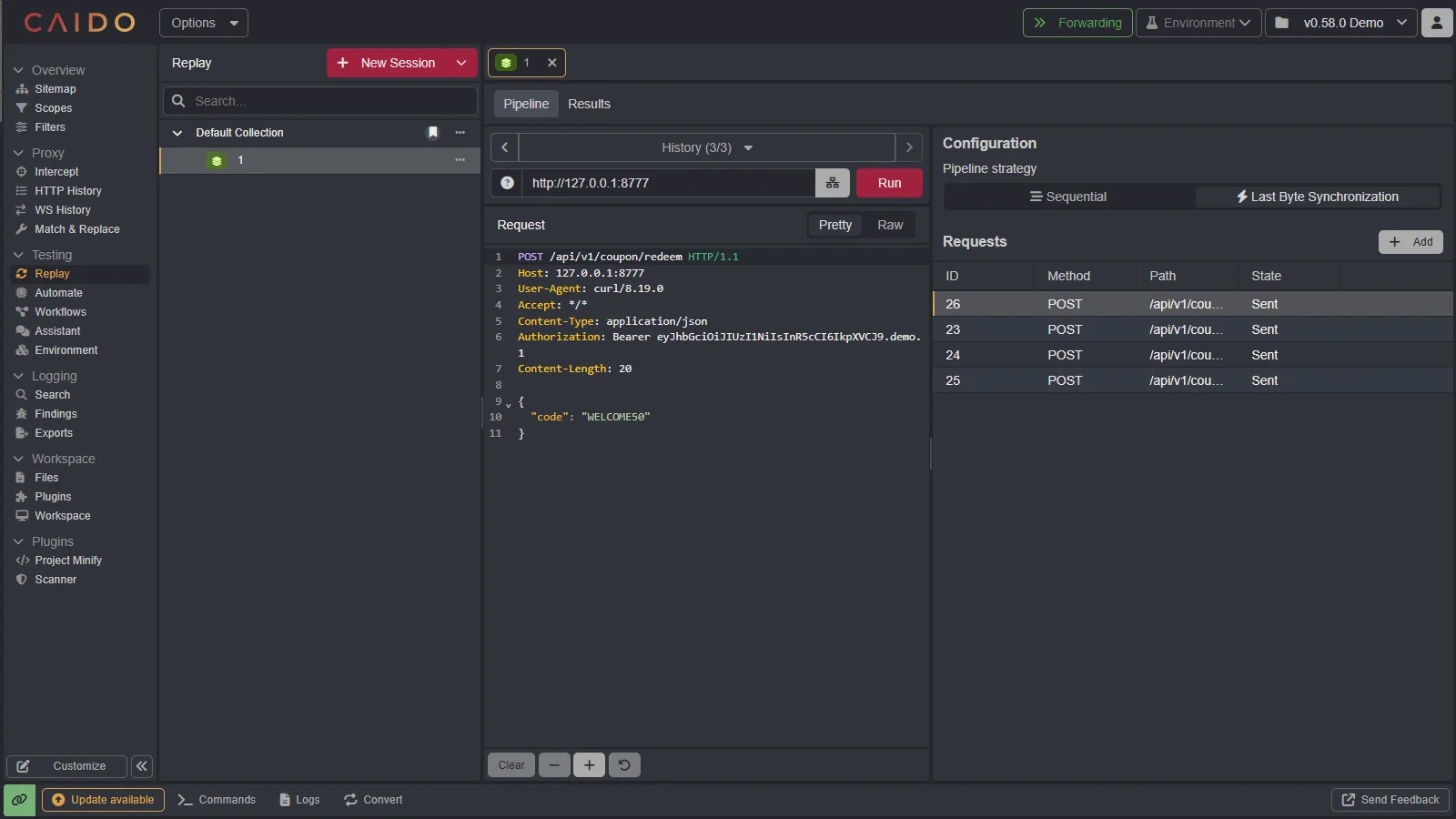 A Pipeline session in Replay with Sequential and Last Byte Synchronization strategies
Two strategies control how the requests are sent:
- Sequential sends requests in a defined order.
- Last Byte Synchronization coordinates the final byte across requests to narrow their arrival window for race condition testing.
The Requests table shows each request's status. The Results tab collects every response from the run, so you can compare them without leaving Replay.
Send Replay and Pipeline requests over HTTP/2
v0.58.0 introduces HTTP/2 support in beta. Replay and Pipeline sessions can send requests over HTTP/2, so you can test a target without forcing the same traffic through HTTP/1.1.
This matters when a target negotiates HTTP/2: forcing the request through HTTP/1.1 changes the protocol under test.
The new network stack is beta and opt-in in this release. Send us feedback if a target behaves unexpectedly.
Filter exact headers and bodies with HTTPQL
HTTPQL now exposes header and body fields on both the request and response namespaces. You no longer need to search raw when you only need one section of the message.
For example, filter by header name, search across header values, or address a specific header directly:
req.header.name.eq:"Authorization"req.header.value.cont:"Bearer"req.header["Authorization"].cont:"Bearer"resp.header["Set-Cookie"].cont:"HttpOnly"You can query request and response bodies separately:
req.body.regex:"password=[^&]+"resp.body.cont:"stack trace"v0.58.0 · HTTPQL filters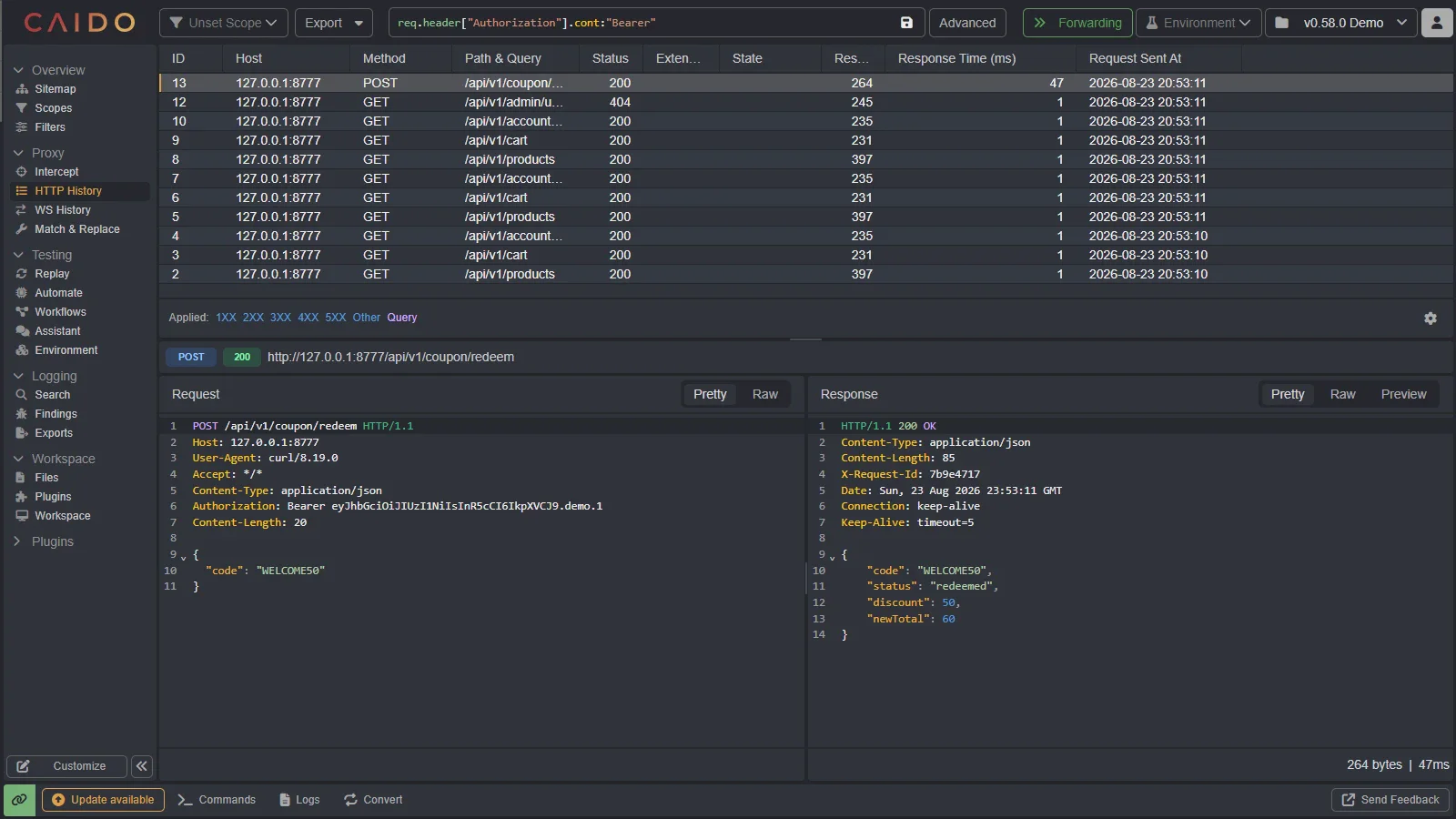 HTTP History filtered by an Authorization header with the matching request visible
Find a token in a header, a parameter in a request body, or an error signature in a response body without scanning the entire message or matching unrelated sections.
Compare plugins before installing them
The rebuilt Plugins page makes it easier to compare plugins before installing them. The store lives under Plugins; anything already on your instance is under Installed.
v0.58.0 · Plugins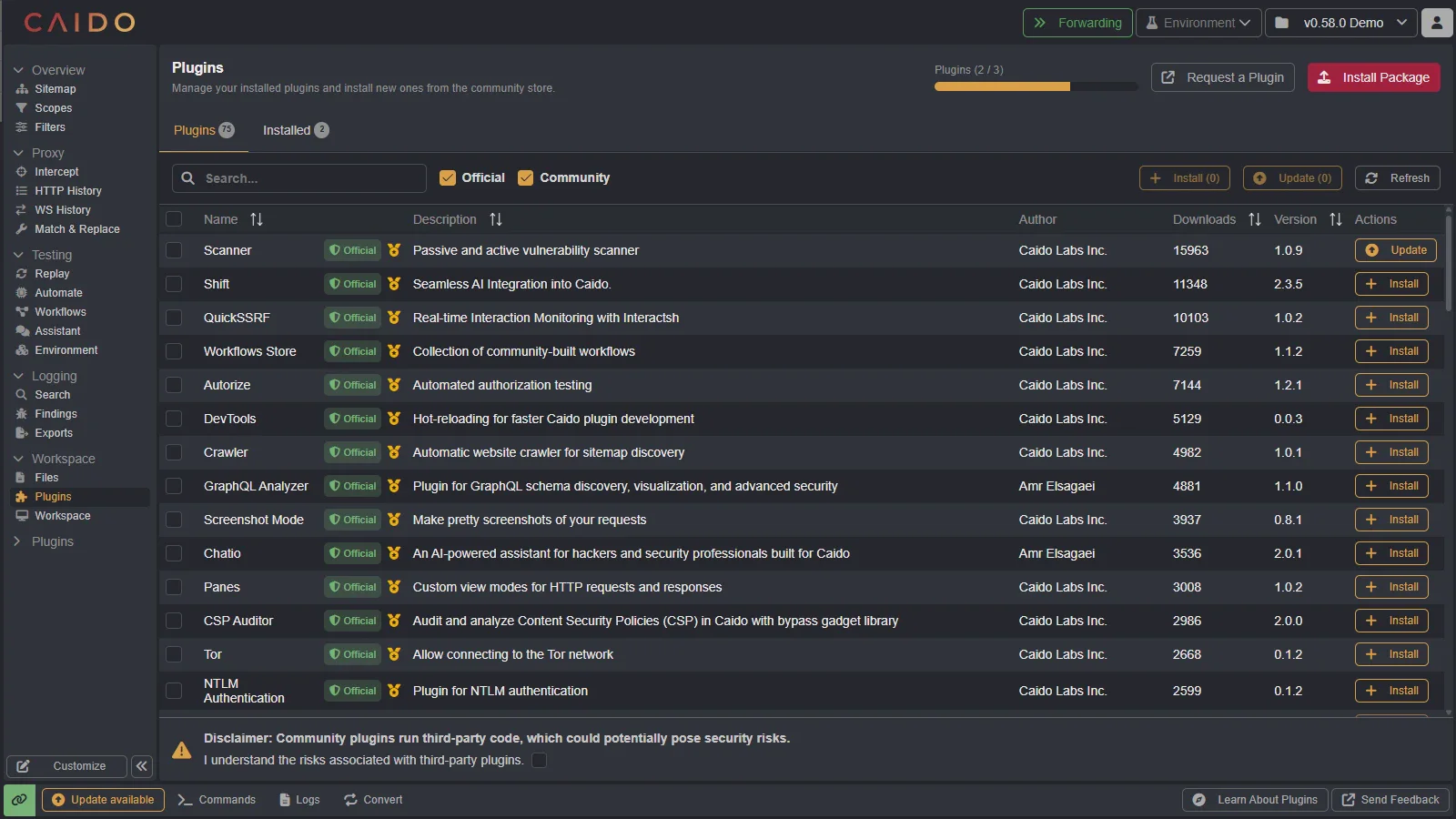 The rebuilt Plugins page with Official badges, quality ratings, filters, and plugin metadata
Each row shows the author, downloads, version, and quality rating. Plugins maintained by Caido carry an Official badge. You can filter by Official or Community, sort the table, select multiple plugins, then install or update them together.
Make the sidebar fit your workflow
The sidebar is no longer fixed. Select Customize at the bottom, then drag pages and plugins into a new order. You can also pin frequent tools, hide items or entire categories, and create categories with New category.
v0.58.0 · sidebar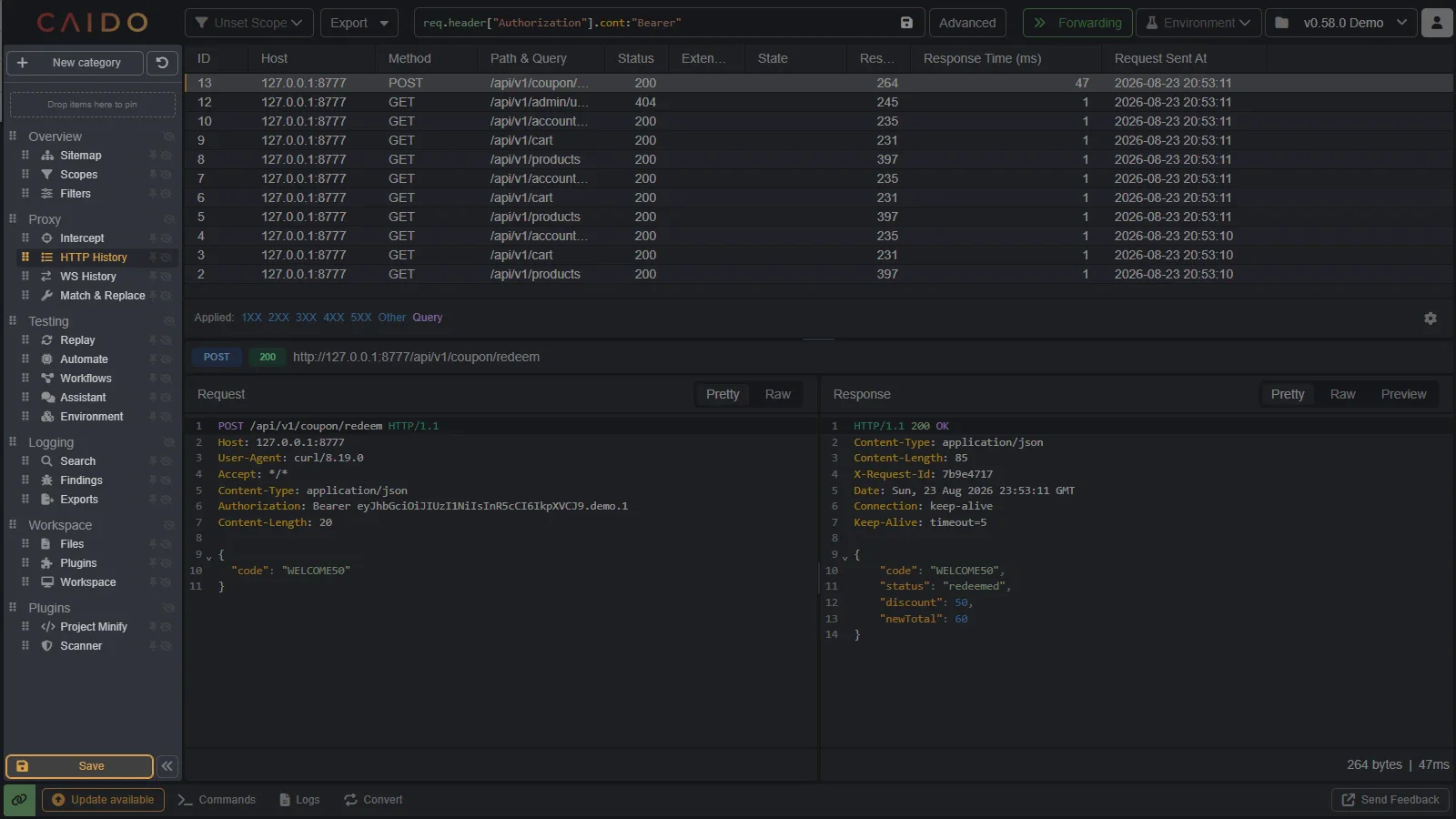 Caido sidebar customization with drag handles, pin and hide controls, and a New category action
Select Save to apply the layout. Reset to defaults restores the original structure. If you spend most of an engagement in Replay and HTTP History, pin those tools near the top and hide the pages you rarely use.
Quality-of-life improvements
The release also includes several smaller workflow improvements:
- Editors stay responsive when opening larger requests and responses.
- Go to in the command palette can now open every page and plugin.
- You can assign the same shortcut to multiple commands.
- You can assign a shortcut to delete the current selection.
- Shift-clicking a Sitemap element fully expands it.
- Replay tab tags now use a clearer visual treatment.
Full change list
v0.58.0 closes 22 reported issues.
Features and improvements
- #705: Add sending grouped requests
- #1448: Send requests in parallel and sequence
- #1254: Add a send-in-parallel workflow to Replay
- #855: Add header filtering to HTTPQL
- #1472: Add body fields to HTTPQL
- #765: Filter on body content
- #1747: Reorder plugins in the sidebar
- #2179: Rework Replay tab tags
- #2170: Add Go to for pages and plugins
- #2147: Add a shortcut to delete the current selection
- #644: Allow the same shortcut on multiple commands
- #74: Fully expand a Sitemap element with Shift-click
Bug fixes
- #2034: Keep typed characters outside placeholders
- #1776: Prevent freezes when opening very long requests
- #1104: Restore JSON folding in the HTTP History request editor
- #1055: Export only the current rows when requested
- #836: Stop Prettify from scrolling HTTP History requests
- #1185: Fix cursor movement between a closing bracket and newline
- #1673: Stabilize the JSON beautifier in Replay
- #703: Prevent crashes when handling long responses
- #1735: Correct the offset when formatting JSON
- #1897: Keep End on the current line
Patches
- 0.58.2:
- The project upgrade window now shows progress logs so you are aware of what is going on
- Storage taken by the data migration is now capped to 1GB, migrations can be restarted if it fails midway
- Migration for headers and body should be linear and not exponential in time
- Replay Pipelines should properly scroll instead of going past the rendering screen
- 0.58.3:
- The HTTP request editor now provides inline autocomplete hints
- Existing Replay requests can now be added directly to a pipeline session
- Fixed a regression where Replay placeholders stopped following the active capture session after sending a request
- Fixed a regression that prevented autocomplete from working in Workflow JavaScript nodes
- Fixed a regression that cleared Replay's undo history after sending a request
- The Replay editor is smarter about how it handles line breaks and CRLF characters
- The onboarding checklist now appears correctly for new installations
Keep reading
Explore the features and workflows behind this release:
- Introducing HTTPQL: the language design, operators, and reusable filters.
- Replay quickstart: the core workflow for editing and resending requests.
- Installing plugins: how to install from the store or a package.
- Caido v0.57.0: WebSocket Replay, StreamQL, and Automate extractors.